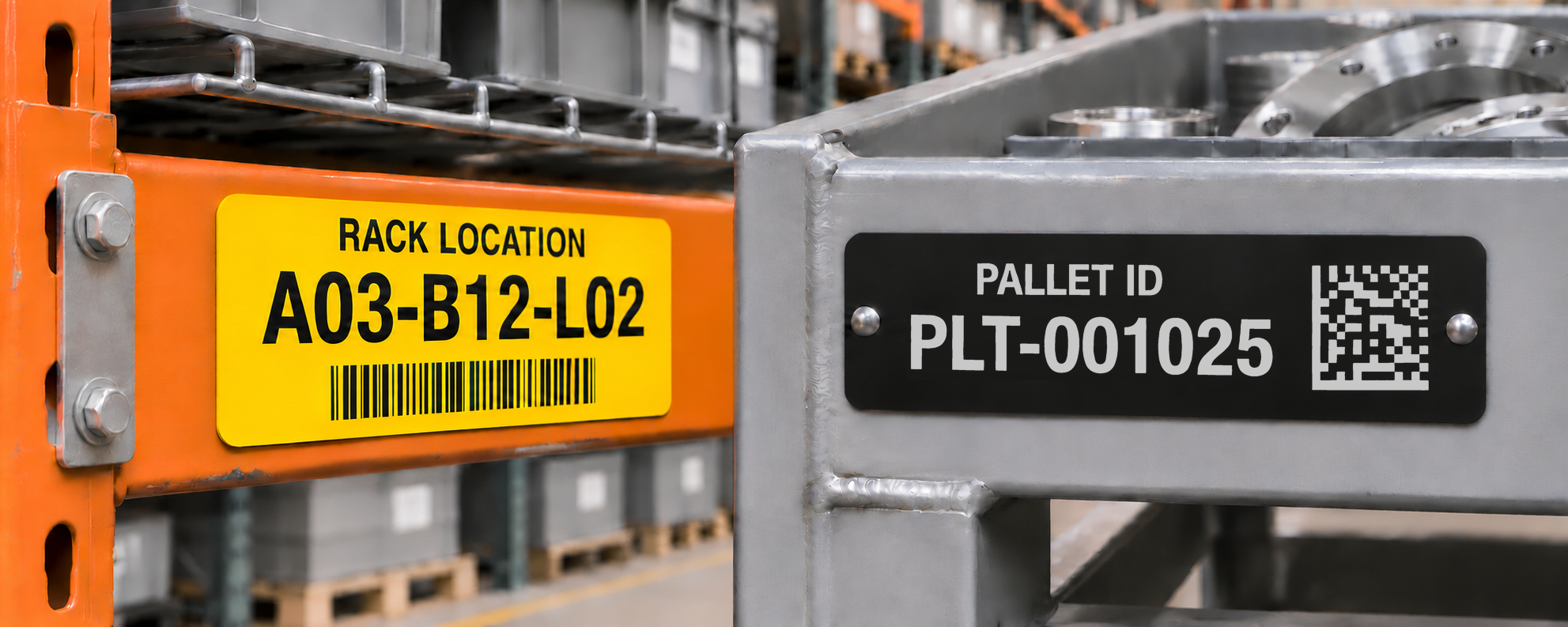
Give every storage location and reusable pallet a clear identity. Inland Products manufactures custom warehouse labels and pallet identification tags with your location codes, serial numbers, barcodes, QR codes or Data Matrix codes. Choose engraved metal or printed aluminum to match the information, mounting surface and conditions in your facility.
Made in the USA at our Menifee, California facility. From rack and shelf identification to reusable production pallets and containers, we can manufacture labels to your dimensions and numbering requirements.
Request a warehouse label quote Compare label options

Printed aluminum
Color-coded location labels with your text and graphics.
Configure printed aluminum labels
Engraved aluminum
Custom metal identification for locations and reusable pallets.
Configure engraved aluminum tags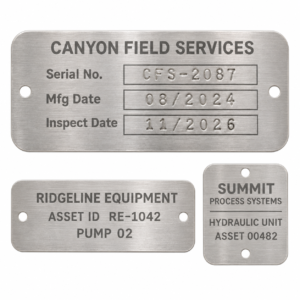
Stainless steel
Custom identification where stainless steel is specified.
Configure stainless steel tagsProduct examples illustrate available materials and marking styles. Your warehouse labels use your own IDs, artwork and dimensions.
Custom Labels for Warehouse Locations and Reusable Assets
A location label identifies where something belongs. A pallet tag identifies the pallet as it moves. Keeping those identifiers separate helps your team connect the right item with the right storage location in your existing records.
| Application | What the label identifies | Example information |
|---|---|---|
| Racks and shelves | A fixed storage position | Aisle, bay, level and position |
| Reusable pallets | The individual pallet | Pallet ID and matching machine-readable code |
| Totes and containers | The reusable container | Container number, department or asset ID |
Choose custom engraved aluminum, printed aluminum or engraved stainless steel. Send your dimensions and intended use for a material and layout review.
Warehouse Rack Labels and Shelf Identification
Make rack locations easy to distinguish with warehouse rack labels displaying your own aisle, bay and level codes. Add a barcode or QR code when your workflow uses scanning to select or confirm a location.
Aisle 03 → Bay 12 → Level 02 → Position 01
This is an illustrative format; your warehouse location labels should follow the structure already used by your team and inventory system.
Allow room for readable characters, the code and any mounting holes. Provide the available beam or shelf space, normal viewing position and scanning distance with your request. Color can help distinguish zones or levels, while the written identifier remains the reference for each location.
Choose Materials and Mounting for Your Facility
| Option | Use it for | What to specify |
|---|---|---|
| Engraved anodized aluminum 0.020″ or 0.040″ thick | Metal location labels and reusable pallet tags | Anodized color, custom dimensions, holes or adhesive backing |
| Printed aluminum 0.020″ thick | Labels combining colored zones, text and graphics | Full-color artwork, protective transparent finish and included 3M 300LSE adhesive |
| Engraved stainless steel 0.030″ or 0.050″ thick | Identification where stainless steel is specified | Type 304 or 430, available finish, dimensions and mounting |
Adhesive Backing or Mounting Holes?
- Adhesive-backed labels: identify the actual bonding surface, including paint or powder coating, and the available flat area. Flag rough surfaces, ribs, curves, oil, moisture and cleaning exposure so the adhesive and placement can be reviewed. Test a sample on the intended surface before a new installation.
- Tags with mounting holes: provide the hole diameter, hole-center locations from named edges and center-to-center spacing. Include the fastener and existing hole pattern when replacing a tag. Leave space around the holes so hardware does not cover the text or code.
For a replacement label, send the existing dimensions, hole layout and exact information. For a new installation, include any required material specification and relevant operating conditions so the proposed part can be reviewed before ordering.
Warehouse Barcode Labels That Match Your Data
Use the identifier and code format required by your inventory or warehouse system. Supply the exact encoded value separately from the text you want people to read. A tag can carry your data, but the records and software determine what happens after a scan.
For QR codes that open a web record, provide the destination URL and confirm that the intended users can access it. For other codes, include the required format and scanner model. Test a finished sample with the actual reader, lighting and working distance before rolling out a new format across the facility.
See our metal barcode and QR code labels for additional code and scanning guidance.
Prepare Your Warehouse Label Schedule
Provide one row per distinct label, with the exact visible text, encoded data, code format and number of copies. Preserve leading zeros and punctuation. Identify intentional duplicates and any replacements that must match an existing ID.
Download the warehouse and pallet label schedule (Excel). The workbook includes a blank schedule and a separate examples tab. Keep the readable ID and exact encoded value in separate columns, and use a label group to connect each row to its dimensions, material and mounting requirements.
| Label purpose | Readable ID | Encoded value | Format | Copies |
|---|---|---|---|---|
| Rack location | A03-B12-L02-P01 | A03-B12-L02-P01 | QR | 1 |
| Reusable pallet | PLT-001025 | PLT-001025 | Data Matrix | 2 |
| Reusable pallet | PLT-001026 | PLT-001026 | Data Matrix | 2 |
| Container | Container 000318 | TOTE-000318 | QR | 1 |
Illustrative data only. Replace these examples with your actual identifiers and required code format. The two pallet rows identify different pallets; each requests two identical tags for that pallet.
Unique IDs and Repeated Tags
If 100 pallets each need a tag on two sides, supply 100 unique pallet IDs with two copies of each: 200 physical tags in total. Two tags on the same pallet repeat its identifier; a different pallet gets its own identifier. A replacement for a damaged tag normally repeats the existing ID. Mark that row as a replacement so it is distinguishable from a new pallet.
Send the completed spreadsheet with your quote request or email it to sales@inlandproducts.com, together with the specifications for each label group.
Reusable Pallet Identification for Tesla
Inland Products manufactured identification tags for Tesla’s on-site parts pallets. The project called for high-contrast laser-etched identification visible from a forklift, together with a 2D Data Matrix code for tracking through production.
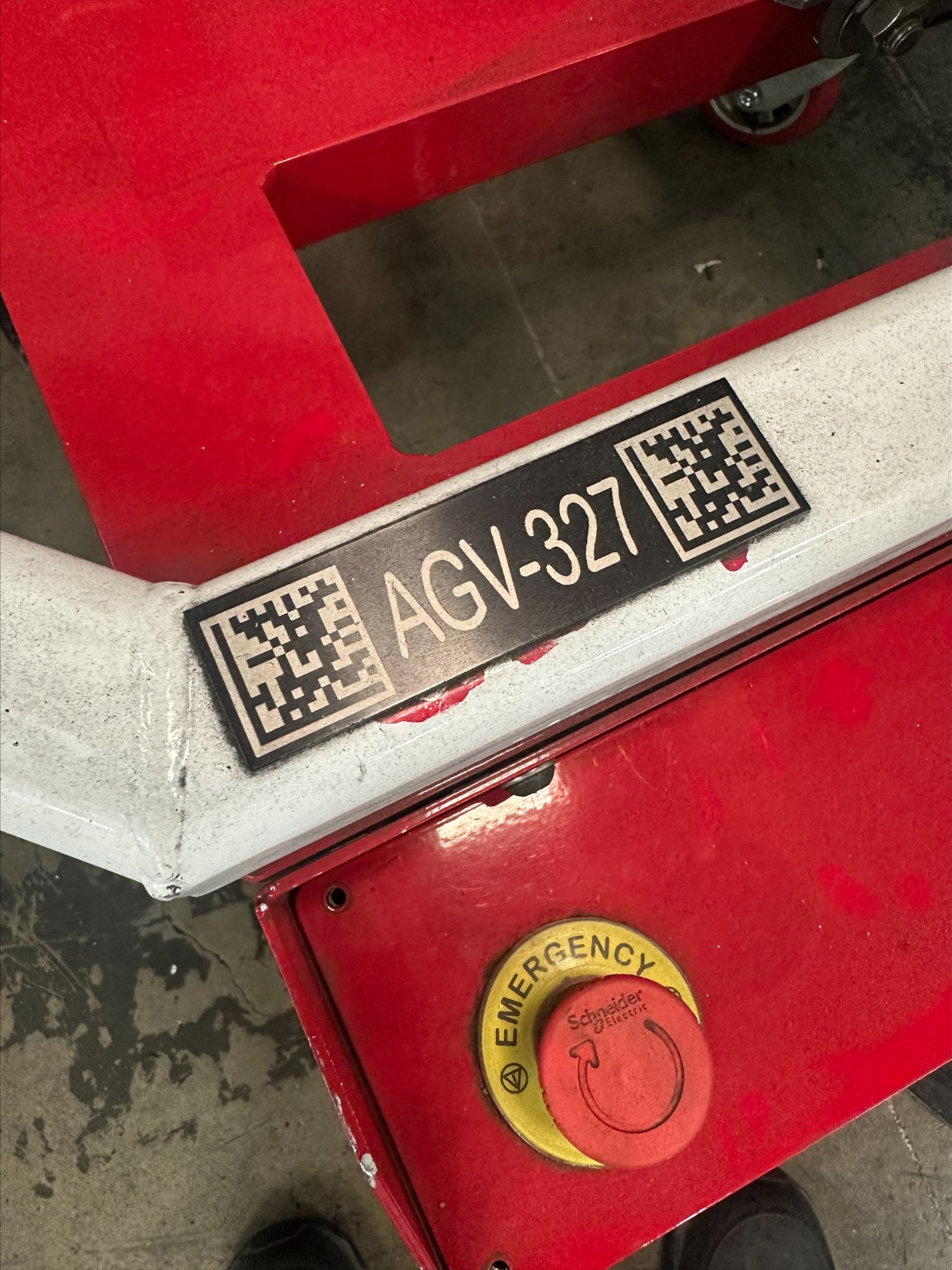
| Project detail | What Inland supplied |
|---|---|
| Finished dimensions | 4.5 × 1.25 inches |
| Material and thickness | 0.040-inch black anodized aluminum |
| Marking | High-contrast laser-etched identification and a 2D Data Matrix code |
| Mounting | 3M industrial adhesive backing |
The layout addressed two ways of identifying the pallet: prominent text for operators and encoded data for the production tracking workflow. The specified aluminum construction and adhesive mounting were part of the finished tag, so the artwork and attachment requirements could be considered together.
For a similar project, send the pallet ID list, available mounting area, mounting surface and intended reading distance. Use the dimensions above as a completed application example; your tag size should fit your own pallet and reader requirements.
Request a Quote for Your Warehouse Labels
Send your label schedule, sample artwork or existing tag along with:
- Total quantity and copies needed per identifier.
- Dimensions, material, color or finish, and thickness requirements.
- Mounting surface, adhesive preference or hole diameters, center-to-center spacing and distances from named edges.
- Exact visible text, encoded data and required code format.
- Reader model, viewing or scanning distance, exposure conditions and required arrival date.
We can review the proposed label layout with your quote. If the project uses multiple sizes or layouts, identify each group in your request so the quantities and specifications stay clear.
Review Your Warehouse Label Proof Before Production
Compare the proposed layout with your location schedule and installation requirements:
- Fit and orientation: confirm dimensions, readable direction, mounting holes and clearance from rack hardware or pallet contact points.
- Location and pallet IDs: check aisle, bay, level and position order; leading zeros; skipped numbers; and copies required for opposite sides of the same pallet.
- Code content: confirm the encoded value, code format and matching human-readable text. Keep graphics, text and holes outside the code’s required clear space.
- Quantity reconciliation: total the requested copies, including intentional duplicates and replacement IDs, rather than counting spreadsheet rows alone.
A digital proof checks layout and content. It does not confirm finished-label scanning performance or adhesion. For a new installation, discuss a physical sample and test it on the intended surface with your actual reader, lighting and working distance.
Warehouse and Pallet Label Questions
What size should warehouse rack labels be?
Start with the available flat mounting area, then allow room for the location text, barcode and required clear space. Send the longest ID in your schedule, reader model and intended scanning distance. There is no single label size that guarantees readability for every rack height or scanner; review the layout and test a finished sample before standardizing it.
Are these permanent pallet tags or shipping labels?
This page focuses on metal identification for reusable pallets, racks and containers. A permanent pallet ID stays with the pallet; a shipping label describes a particular load or shipment. Keep those identifiers separate when the contents change, and provide your existing label format if the two need to be used together.
Can every label have a different number or code?
Yes. Supply the full list of IDs and encoded values, plus the number of copies needed for each. If you use a sequence, identify the prefix, starting and ending numbers, leading zeros and any exclusions.
Can you match our existing rack numbering?
Yes. Send your current format and label schedule, with a photo or sample if available. Identify which information appears on the label and which information is only for order reference.
Can I order custom sizes and mounting holes?
Yes. Include the width, height, thickness, corner requirements and hole dimensions and positions. We will review these details against the selected material and product.
Will the labels work with our warehouse software?
The code must contain the value and use the format your system expects. Provide those requirements and test the finished label with your reader and software. A label by itself does not supply a software integration or live tracking service.
How long does production take?
Stock item blank orders usually ship in 5–10 business days. Custom and semi-custom blank orders and all engraved orders usually ship in 15–20 business days. Confirm printed-label timing with your quote. Shipping transit is additional. Include your required arrival date so the schedule can be confirmed for your order.
What determines the price and minimum quantity?
Custom engraved anodized aluminum and custom engraved stainless steel tags each have a 10-piece minimum on their linked product pages. Other products and configurations may have different minimums. Material, dimensions, quantity, marking and mounting requirements affect pricing. Use the product configurators above or send the full schedule for a project quote, especially when it includes several sizes or layouts.
Explore related metal asset tags and custom equipment tags.