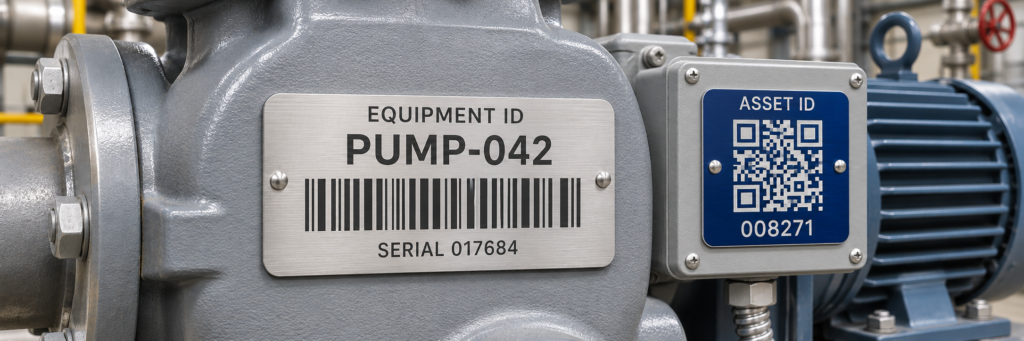
Custom metal barcode labels in aluminum and stainless steel for equipment, inventory and asset identification. Add barcodes, QR codes, serial numbers and your logo, with adhesive backing or mounting holes to suit your application.
Choose laser-engraved metal tags or full-color printed aluminum labels, made in the USA by Inland Products in Menifee, California. Our in-house manufacturing team handles laser engraving and digital printing. Start with a stock size or send us your dimensions and marking requirements for a custom quote.
Request a quote for custom barcode or QR code labels, or compare the label options below.
Choose Your Metal Barcode Tags
Select the material and marking method that suit your mounting surface, environment and scanning equipment. Each option can combine a machine-readable code with a human-readable ID.
 Custom Engraved
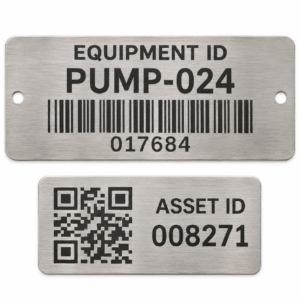 Custom Engraved
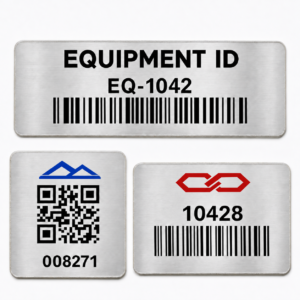 Custom Printed
Need an existing shape and size? Browse stock tags that can be engraved with your code and information.
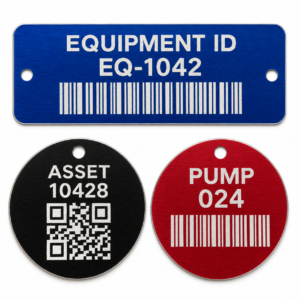 Stock Engraved
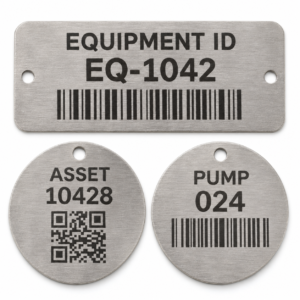 Stock Engraved
Which Material and Marking Method Should You Choose?
Engraved Aluminum Barcode Labels
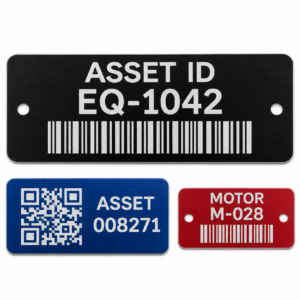
Anodized aluminum offers a lightweight metal label with a choice of colors. Laser engraving creates light markings against the anodized surface. Our custom engraved aluminum tags are available in 0.020-inch or 0.040-inch thicknesses, with custom dimensions, hole and adhesive options. Add your code, asset number, text or logo, and confirm that the chosen color and layout suit your scanning equipment.
Stainless Steel Barcode Tags
Our custom engraved stainless steel tags offer Type 304 or Type 430 stainless steel and 0.030-inch or 0.050-inch thickness options. Combine barcodes, QR codes and serial numbers on a custom layout. Specify the finish, dimensions and mounting requirements, and tell us about moisture, chemicals, cleaning or abrasion so we can review the application with you.
Printed Aluminum Barcode Labels
Combine barcodes and QR codes with full-color logos, instructions or color-coded information. Our custom printed aluminum labels use 0.020-inch aluminum, a protective transparent finish and included 3M 300LSE adhesive backing. Choose your dimensions and corners, then supply your artwork and variable information.
QR Code Asset Tags That Connect to Your Records
A metal tag gives each asset a visible identity. A QR code can carry an asset ID or a link to a record, manual, inspection form or service page that you manage. Place the same ID in readable text beside the code to help staff identify the asset without scanning.
Use the same destination on every tag, or provide a different ID or URL for each asset. QR code asset tags can support equipment inspections, tool identification, rental inventories and maintenance workflows when paired with your existing records or software.
Barcode or QR Code: Which Should I Choose?
For additions to an existing inventory or asset system, use the code format your software and reader require. Send a sample of your current label with your request. A QR code can contain a URL that opens a record, manual or inspection form. Choose the information you need to retrieve, then confirm that your intended device can read the finished label. A phone camera and a dedicated barcode reader may support different formats.
Sizing Your Barcode or QR Code
The required code area depends on the format, amount of encoded data, scanning distance and reader. Contrast and the metal finish also affect readability. Allow clear space around the code, separate from text, logos and mounting holes. There is no single minimum size that fits every application. Include your scanning requirements with the quote request and discuss testing a finished sample with your equipment before rollout.
Barcode Asset Tags for Equipment and Inventory
Give machines, tools, storage locations and reusable containers a consistent identification format. Custom barcode labels can include your company name, an asset number, a location or department, and a code that matches your records.
For replacement labels or additions to an existing system, matching the data format is just as important as matching the appearance. For identification projects that do not require a code, explore our equipment tags.
Project Example: QR Code Tree Tags for PG&E
Inland Products is working with PG&E on a large-scale tree-identification project in California. Each tag combines a high-visibility background with a unique QR code and matching human-readable text, making the tree’s identifier available both visually and by scanning.
Specialized bonding agents are applied to support long-term outdoor use, with an intended service life measured in decades. The tags support PG&E’s tree-identification work as part of its efforts to address wildfire risk in California.
Adhesive Labels or Tags with Mounting Holes?
| Option | Consider it when | Include with your request |
|---|---|---|
| Adhesive-backed metal labels | You want to attach a label directly without drilling | Surface material, texture, curvature, cleaning and exposure |
| Metal tags with mounting holes | Your installation uses screws, rivets, ties or other hardware | Hole size and position, available space and attachment method |
The complete label system matters: metal, marking, adhesive or hardware, and the environment in which it will be used. Tell us about your application so the quote reflects those requirements.
How to Order Custom Metal Barcode Labels
- Choose your label. Select engraved aluminum, stainless steel or printed aluminum. Provide the width, height, quantity, color or finish, and adhesive or hole requirements.
- Send your data and artwork. Include the required barcode format or QR-code content, readable IDs, additional text and logo. Use your own spreadsheet or the optional template below to show which information changes between labels.
- Review the proposed layout. Confirm the dimensions, marking, mounting details and schedule before production. Use the proof checklist below, and include your intended scanning device when requesting a new label format.
Example Barcode and QR Code Data Spreadsheet
Use one row for each distinct combination of code data and visible text. Quantity means the number of copies of that row. Keep the information encoded in the code separate from the ID or text people will read on the label.
Download the optional barcode and QR label data template (.xlsx). It includes a blank entry sheet with text-formatted ID fields and an example sheet. You can also send your existing data file with your quote request.
| Code format | Encoded data or URL | Readable ID or text | Quantity |
|---|---|---|---|
| QR code | 000125 | 000125 | 1 |
| QR code | 000126 | 000126 | 1 |
| QR code | https://example.com/assets/008271 | 008271 | 1 |
| QR code | https://example.com/manuals/pump | Pump manual | 100 |
The first two codes contain an ID; the third contains an asset-record URL. The last row requests 100 identical manual labels. For a barcode system, specify the exact format required by your software and reader.
Repeated Codes, Unique IDs and Replacements
- Unique asset tags: list each asset's code and readable ID separately. For a numbered sequence, specify the first and last values, prefixes, leading zeros and any skipped numbers.
- Repeated codes: one row can request multiple identical labels. If the QR destination stays the same but the readable asset ID changes, use a separate row for each ID. A shared manual URL does not identify individual assets by itself.
- Replacement labels: provide the original encoded value and readable ID so the replacement refers to the same asset record.
Before sending your file, check for unintended duplicates, missing rows and the total quantity. Store IDs and encoded data as text to preserve zeros, hyphens and exact characters. Open each URL and confirm that the intended users can access its destination, including any required sign-in.
Artwork Proof and Finished-Sample Checks
Our graphics department offers a free mockup with your quote request, so you can review the proposed layout. Before approving artwork, check:
- Fit and mounting: tag dimensions, hole locations, adhesive choice and clear space between the code, text, logo and edges.
- Data and quantities: exact encoded content, readable IDs, the first and last entries in a sequence, intentional duplicates and copies per entry.
- Artwork and destinations: logo placement, text orientation, and the correct record or page for each QR-code destination.
A digital mockup helps you review layout and content; it does not establish how the finished metal label will scan. For a new application, discuss a sample made with the proposed material and marking process, and agree on testing arrangements before approving the full run. Test with your intended phone or reader at the installed distance and angle, under the lighting and surface conditions where the label will be used.
Metal Barcode Label FAQs
Can every tag have a different barcode or QR code?
Yes. Labels can include variable information such as individual asset IDs, serial numbers and QR-code destinations. Send your data list and explain which fields change from tag to tag.
Can you add a logo and readable asset number?
Yes. Include your logo, text and numbering with the code. Printed aluminum supports full-color artwork; laser-engraved layouts use the contrast produced by the material and marking process.
Will the codes work with my scanner or phone?
Compatibility depends on the code format and your scanning device, as well as the finished label. Tell us which reader or phone you plan to use and review the code sizing and sample-testing guidance above before choosing a new label format.
Are metal barcode labels suitable for outdoor use?
Material selection depends on sunlight, moisture, temperature, cleaning chemicals and wear. Adhesive performance also depends on the mounting surface. Include those conditions with your request so the finished label can be reviewed for the application.
Do QR code asset tags include tracking software?
The tags provide the physical identification. Any records, website destinations, permissions or asset-management software must be supplied and maintained separately. Tell us what data or URL your system needs on each tag.
What are the minimum order and lead time?
Minimum order values, quantities and production estimates vary by product and configuration. See the selected product page for current requirements, or send your quantity and required delivery date with the quote request.
Get a Quote for Your Barcode or QR Code Labels
Send your quantity, dimensions, material, mounting method and artwork or data file. Include your scanning requirements and required delivery date so we can review the details together.
Request a Quote, call 1-800-481-5500 or email sales@inlandproducts.com.