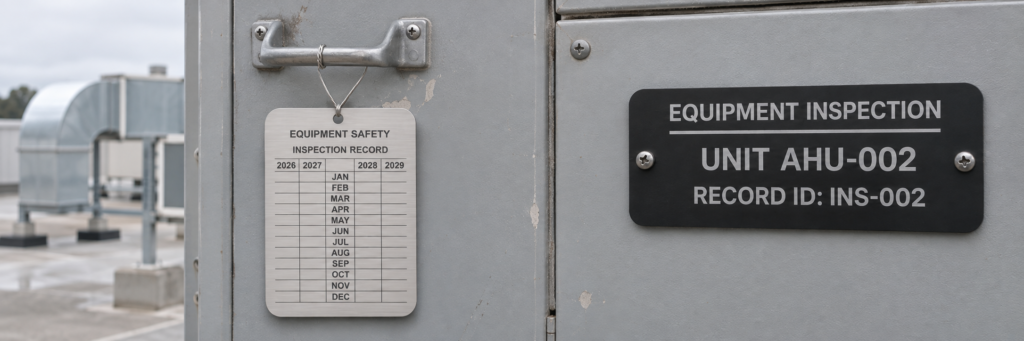
Custom industrial inspection tags help connect equipment to inspection schedules and maintenance records. Inland Products manufactures engraved and printed metal tags with equipment identifiers, inspection headings, customer-supplied dates and optional QR codes.
Choose stock tag shapes or custom dimensions in stainless steel, aluminum or brass. Specify the information that stays on the tag and how your team will update inspection results.
Request an Inspection Tag Quote
Custom Inspection Tags for Equipment and Maintenance
Keep identification consistent across your inspection schedule, equipment and records. Order matching layouts for a facility or supply a different identifier for each tag. Custom inspection tags can display asset numbers, equipment names, locations, department information and your company logo.
- Equipment inspection tags: identify pumps, air-handling units and machinery against your inspection schedule.
- Maintenance identification: keep equipment numbers and locations consistent across service records.
- Custom inspection layouts: include the headings, fixed dates and record references your team uses.
For information that changes after every inspection, decide whether the record will be updated on the equipment or in your own record system. A permanently marked equipment ID can remain in place while the associated inspection record is updated separately.
Customer Example: Elevator Inspection Tags
Inland produced custom inspection tags for Elevator Repair Service using 0.020-inch printed anodized aluminum with 3M 300LSE adhesive backing. The layout combines E.R.S. Inc. branding with open DATE and TESTED BY boxes for inspectors to stamp after testing.
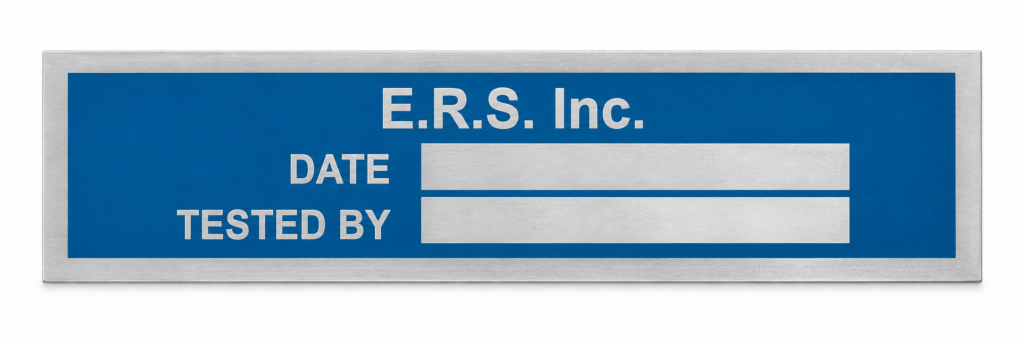
The thin aluminum was selected for ease of stamping. Printing reproduced the company’s branding and provided a clean, finished appearance on an industrial part while leaving designated areas open for inspection entries.
For a similar project, include the stamp or marking tool, required entry-box dimensions and mounting surface with your quote request. These details help define a tag that works with your inspection process.
Metal Inspection Tags and Material Options
Select a material and marking process for your environment. The products below show available engraved tag constructions; your inspection wording and layout are supplied to order.
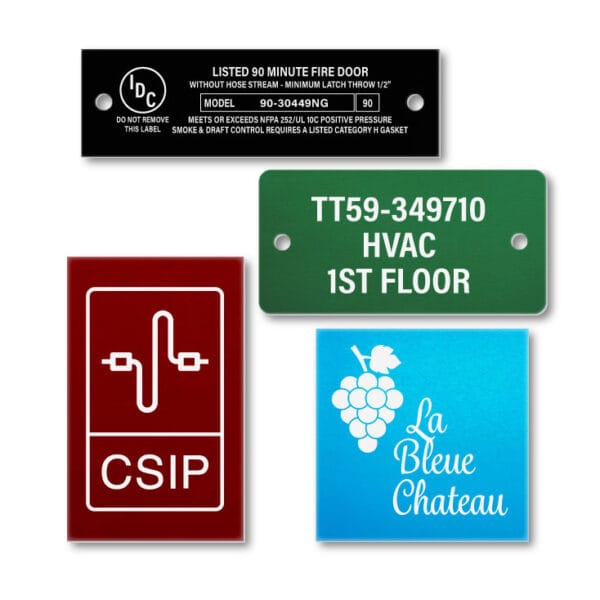
Aluminum Tags
A lightweight option with anodized color choices for identifying equipment by department or location. Available in 0.020 or 0.040 inch thicknesses with custom dimensions and engraving. Laser engraving appears light against the anodized color; darker colors give stronger contrast.
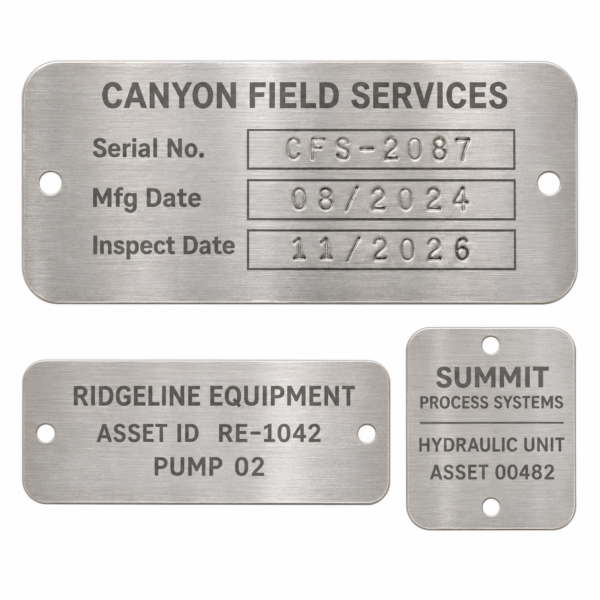
Stainless Steel Tags
Choose 304 or 430 stainless steel in 0.030 or 0.050 inch thicknesses. Finish options include tumbled, brushed, and 2B dull smooth; see the product configuration for available combinations.
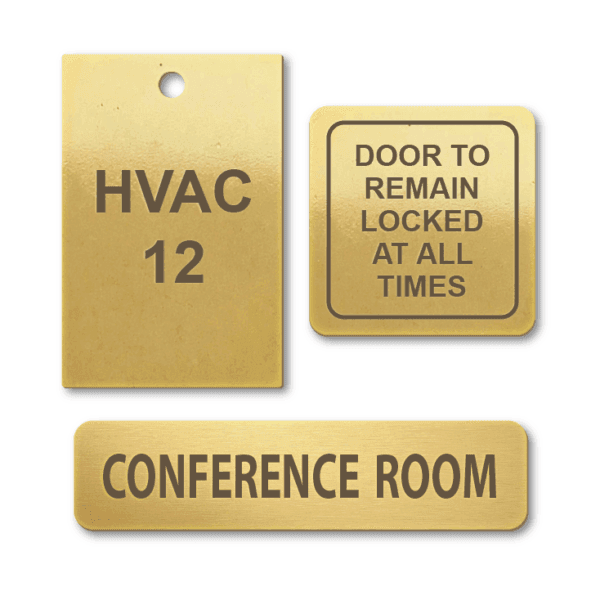
Brass Tags
Choose brass for its distinctive metal appearance. Options include 0.020 inch lacquered satin brass and 0.040 inch tumbled or lacquered satin brass, engraved to your specifications.
Material, finish and marking method should match the application. Tell us about outdoor exposure, cleaning products, abrasion and temperature before selecting your tags. Dimensions, thickness and mounting options depend on the selected product.
Explore metal tag materials or custom printed aluminum nameplates.
Inspection Tag Sizes and Mounting
Size the tag around the text, viewing distance and any QR code. Send overall dimensions, thickness, corner shape and a drawing with hole diameters and center-to-center spacing. For replacement tags, measure the existing mounting points rather than estimating from a photograph. Show each hole center’s distance from the tag edges, and leave room for fastener heads so they do not cover text or codes.
- Hanging tags: specify the attachment hole and the clearance needed for your chosen wire, ring or tie.
- Screw or rivet mounting: provide hole locations and confirm the available mounting area on the equipment.
- Adhesive mounting: identify the mounting surface, usable flat area, any curvature, temperature and cleaning exposure. Include a specified adhesive, such as the 3M 300LSE used in the Elevator Repair Service example, when your application requires it.
Identify any required attachment hardware separately in your quote request.
Inspection Tag Layouts Made to Your Specifications
Build the layout around the information your team needs to identify. Common fields include equipment ID, inspection reference, location, inspection date, next inspection due and inspector identification. Clearly identify which information should be permanently engraved or printed during production.
If your process requires technicians to write on, stamp or punch the tag after delivery, include that requirement with your quote so the construction and marking method can be reviewed.
Fixed Identification or an Inspection History Grid?
A permanent equipment ID can stay on the machine while inspection results change in your records. An on-tag inspection history grid serves a different purpose: it needs space for repeated entries and a construction compatible with the marking method. Send the number of entries, date format, inspector fields and proposed writing or punching tool for review. A printed grid alone does not make a tag writable or punchable.
Inspection Tag Order Template and Sample Data
Download the inspection tag order template (Excel) to provide construction details, quantities, exact text and optional QR destinations. It includes blank order rows and separate instructions with examples.
| Quantity | Equipment ID | Tag information | QR destination |
|---|---|---|---|
| 2 | AHU-002 | Two identical inspection ID tags | The same AHU-002 record on both copies |
| 1 | AHU-003 | A different equipment identifier | The AHU-003 record |
| 25 | None | A common inspection grid from supplied artwork | No code required |
These are illustrative ordering examples, not customer records. Use one row per distinct tag and a quantity for identical copies. Preserve leading zeros, prefixes and punctuation. Separate the exact text to mark from reference-only notes, and identify any fields that should remain blank for inspectors.
QR Codes for Inspection Records
Add a QR code that opens a record, form or instruction page you manage. This lets the physical tag identify the equipment while inspection dates and results are maintained in your system. Supply the destination URL for each tag and test the links with the devices and access permissions your team will use. Use a shared URL when every tag should open the same instructions, or a unique URL for each equipment record. Include a readable equipment ID so technicians can identify the asset without scanning. Inland supplies the tags; the linked records and software remain under your control.
Order Custom Industrial Inspection Tags
Send the quantity, material, dimensions, thickness, mounting details and exact text or artwork. For variable information, include your equipment list and any corresponding QR destinations. Describe the environment and tell us whether the information is fixed or must be updated in the field.
Prepare Your Inspection Tag Order
- Define the layout: separate fixed headings from identifiers or dates that vary by tag.
- Supply the data: use one spreadsheet row per distinct tag, with separate columns for equipment ID, visible text, QR URL and quantity. Mark duplicate IDs as intentional when ordering identical copies.
- Review the digital proof: reconcile the quantity for each design with your equipment list. Check spelling, leading zeros, dimensions, hole positions, text size, open entry boxes and the approved artwork revision before authorizing production.
- Plan repeat orders: retain the approved layout and identify which data changes on the next batch.
Proof, QR and Field-Marking Checks
For coded tags, check that each QR destination matches the readable equipment ID and opens with your team’s devices and access permissions. When scanning distance or inspector stamping is critical, request a sample review using the intended device or tool before committing to the full run. Digital proofs show the layout; they do not establish how a physical tag will scan or accept a stamp in your application.
Minimums and Production Timing
The linked custom engraved aluminum and stainless steel products start at 10 pieces. Inland’s ordering FAQ also lists a $200 minimum order value for custom, engraved or printed orders; a product’s piece minimum and the order-value minimum are separate requirements. Confirm the minimum for your selected printed or engraved construction with your quote.
Custom tags typically require 10–15 business days for production. Confirm the schedule and shipping transit time against your required delivery date. Price depends on quantity, size, material, marking and options such as second-side artwork or adhesive.
Send your layout, equipment list and mounting requirements to get started.
Request an Inspection Tag QuoteIndustrial Inspection Tag FAQs
Can each inspection tag have a different number?
Yes. Supply the exact identifier for each tag or specify a numbering sequence. Keep leading zeros, prefixes and punctuation consistent with your equipment records.
Can I order custom sizes and mounting holes?
Custom dimensions and mounting configurations are available. Include a drawing or dimensions showing the hole sizes and locations so the tag can be quoted to your requirements.
Can the tags show inspection dates or due dates?
Yes, dates supplied with your artwork can be engraved or printed as fixed information. If dates will change, specify how your team intends to update them. A QR-linked record is another option for keeping changing information in your own system.
Can technicians write on or punch these tags?
Field marking depends on the material, finish and marking tool. Inland produced the Elevator Repair Service tags above with open boxes for inspector stamping on 0.020-inch printed anodized aluminum. Include your proposed tool and entry-box size with your quote so the construction can be reviewed for your application.
Do you provide the inspection tracking software?
The tags can include QR codes pointing to URLs you supply. Your organization provides and manages the linked software, forms and records.
Are these tags certified for a particular inspection standard?
Tags are produced to the specifications agreed for your order. Include any required standard, wording or format for review; the tag itself does not certify the equipment or replace an inspection.
Related Identification Products
Browse equipment tags for general identification, valve tags for valve schedules, and metal tags for additional material options. For code-focused projects, see barcode and QR code tags.